
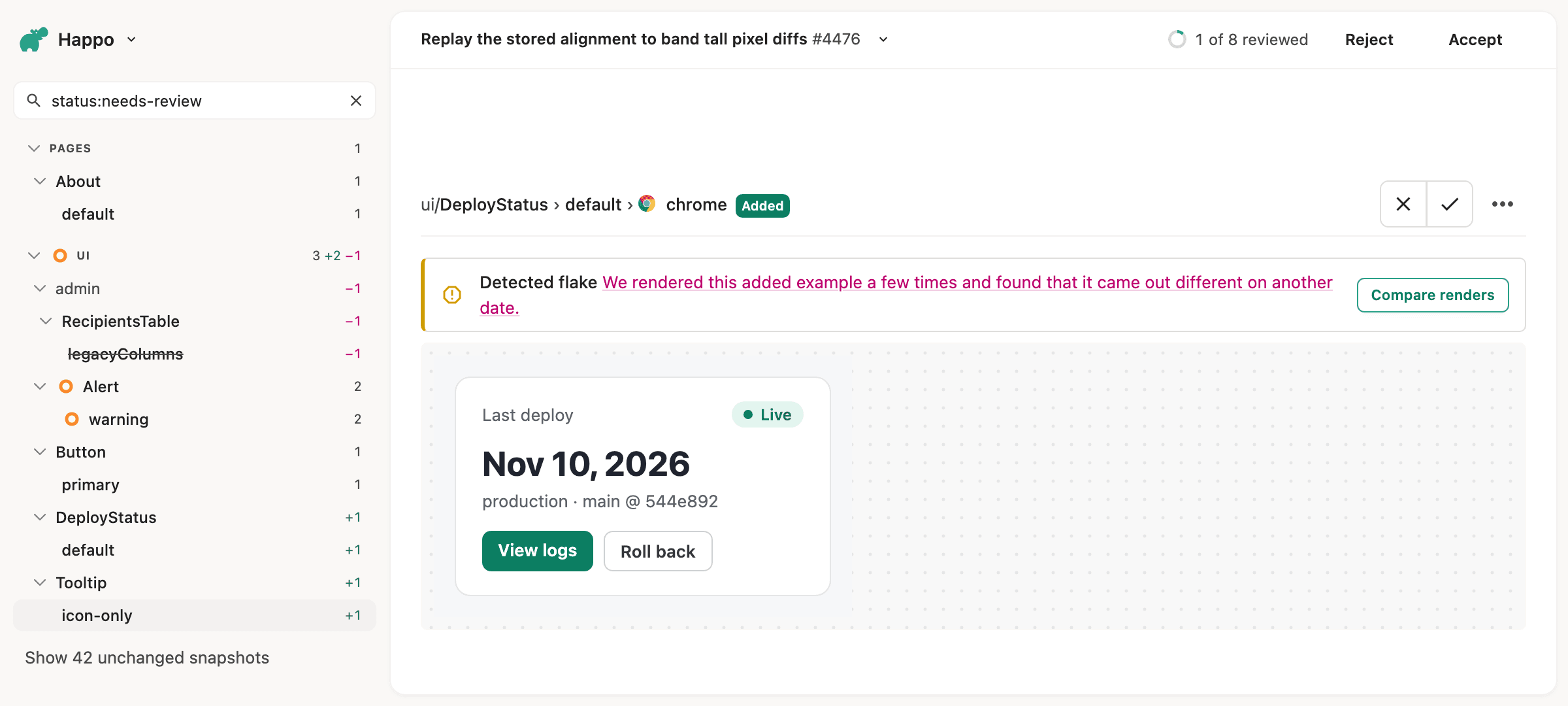
Most flaky diffs start out as an accepted snapshot that was flaky all along.
When you add a story or a test, Happo shows its snapshot as Added. It has no baseline yet, so there is nothing to compare it with. A reviewer looks at it, it looks right, and it gets accepted. If it shows today's date, catches an image before it loads, or stops an animation at a different frame each time, none of that shows up in this pull request. It shows up later, as a diff in somebody else's pull request, for a change they didn't make.
Starting today, Happo checks every added example for flakiness before you accept it. And if you want to make sure a flaky example never gets accepted, a new config option blocks approval until it's fixed.
How it works
When a comparison has added snapshots, Happo renders each added example again in the same browser and viewport:
- Once as it was. This catches timing problems: late images, unfinished animations and races between data and rendering.
- Once as if it were another date. Happo moves the page's clock about a year ahead, which catches examples that show the current date or something worked out from it, like "3 days ago" or the year in a footer. Only
Datemoves, so timers and animations run as they did in the original render. iOS Safari can't set the clock, so there the example is rendered again once, without the date change.
If a render comes out different from the one in the report, the example gets a Detected flake notice on the comparison page. A difference only counts if a comparison would show it as a diff, so your project's compare threshold and the diffs you have ignored apply here too.
While Happo is still rendering, the notice says Checking for flakes. You can start reviewing right away: the comparison isn't held up in the meantime unless you block approval on flaky examples (more on that below).
What to do with a flaky example
Click Compare renders in the notice to see the report's render next to the one that came out differently, as a side-by-side, a diff or a swipe. That usually makes the cause obvious.
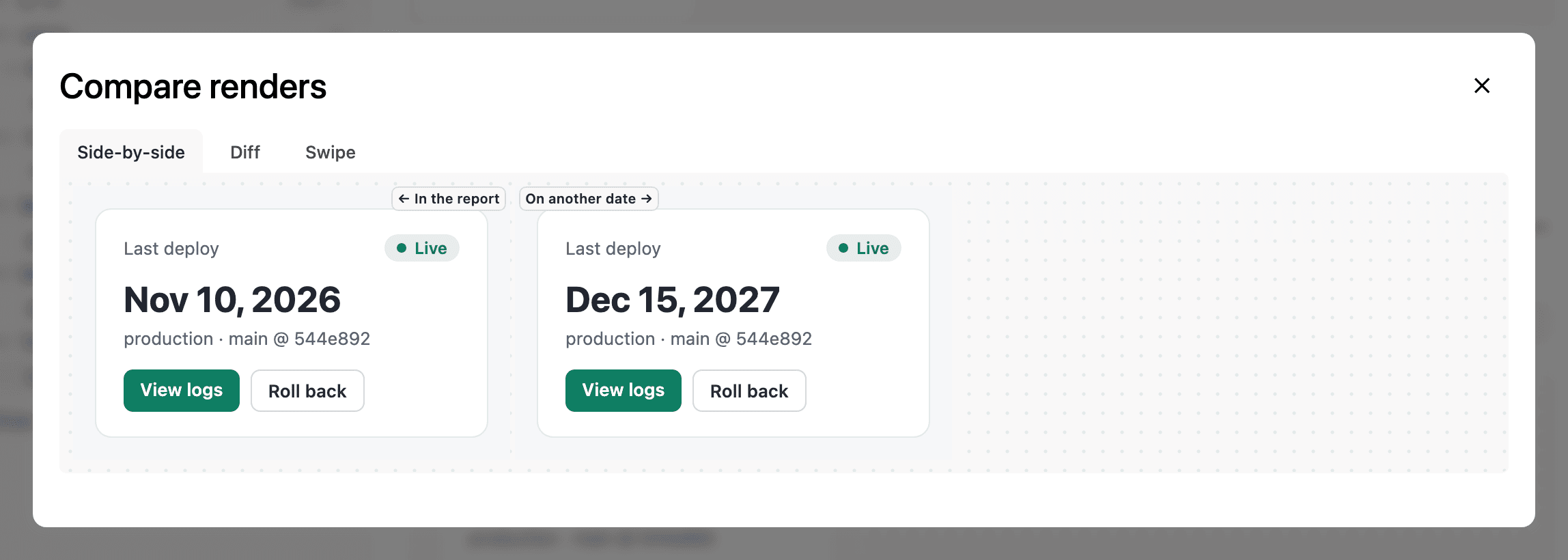
When the notice says the example came out different on another date, the example shows the date. Pass a fixed date to the component, or freeze time with a library like mockdate or Sinon.js. When it came out different on a repeat render, look for content that loads late, animations, random data and generated ids. Spurious diffs has tips for the most common causes.
Then fix the example before you accept it. Accepting a flaky example makes it part of the baseline, and every later run gets a chance to differ from it. Fixed in the pull request that adds it, it never causes a spurious diff for anyone.
There is nothing to report as a flake here. Reporting a diff as flaky tells Happo to ignore that exact before-and-after pair, but an added snapshot has no before, and the flakiness lives in the example itself. The fix belongs in your code or your test setup.
Blocking approval
The notice tells a reviewer an example is flaky, but nothing stops them from accepting it anyway. To make sure a flaky example can't get into your baseline, turn on flakyAddedSnapshots in the blockApproval option of your Happo config:
// happo.config.ts
import { defineConfig } from 'happo';

export default defineConfig({
  // ...

  blockApproval: {
    flakyAddedSnapshots: true,
  },
});
With it on, a comparison with a flaky added example can't be approved:
- The Accept button on the comparison page is disabled and says the added examples are flaky
- Approving through the API responds with a
409, and an AI assistant approving through the MCP server is refused the same way - The status on the pull request stays failed until you fix the example and Happo runs again
Approval also waits while Happo is still checking the added examples, which usually takes a few minutes. An approval carried over from an earlier commit lands once the check finds nothing flaky. An example Happo couldn't render again doesn't block anything.
Unlike blockApproval's other conditions, flakyAddedSnapshots is off unless you set it, since it makes every comparison that adds examples wait on the check. Because it lives in your config, you can turn it on in one pull request and fix any flaky examples there without affecting other work in the repository.
AI assistants see it too
If you review comparisons with an AI assistant through the Happo MCP server, it sees the same check. get_comparison_details tells the assistant which added snapshots are flaky and whether it was the date that changed them, so it can tell you before you accept them, and suggest a fix.
Pricing and requirements
The extra renders are free. They don't count toward your snapshot usage or quota: only the snapshots in your reports do.
The check is on for every account on happo.io, with no change to your config. A comparison that adds many examples, such as a project's first, can take a while to check.
blockApproval.flakyAddedSnapshots needs happo 7.4.0 or later.
See Detected flakes in new examples and the blockApproval reference in the docs for more.

